Proxy errors
An HTTP status tells a client what kind of failure occurred. Custom headers add a code and message that explain the cause. For example, a client receiving 429 with CONNECTION_LIMIT can reduce its concurrent connections instead of changing credentials.
Open Workspace Settings → Error responses to choose the header names and what each error says. These settings are optional and apply to all proxy clusters, not individual customers or packages.
Configure one error
Section titled “Configure one error”You need permission to edit settings. Administrators with view-only access can inspect the configuration but cannot save changes.
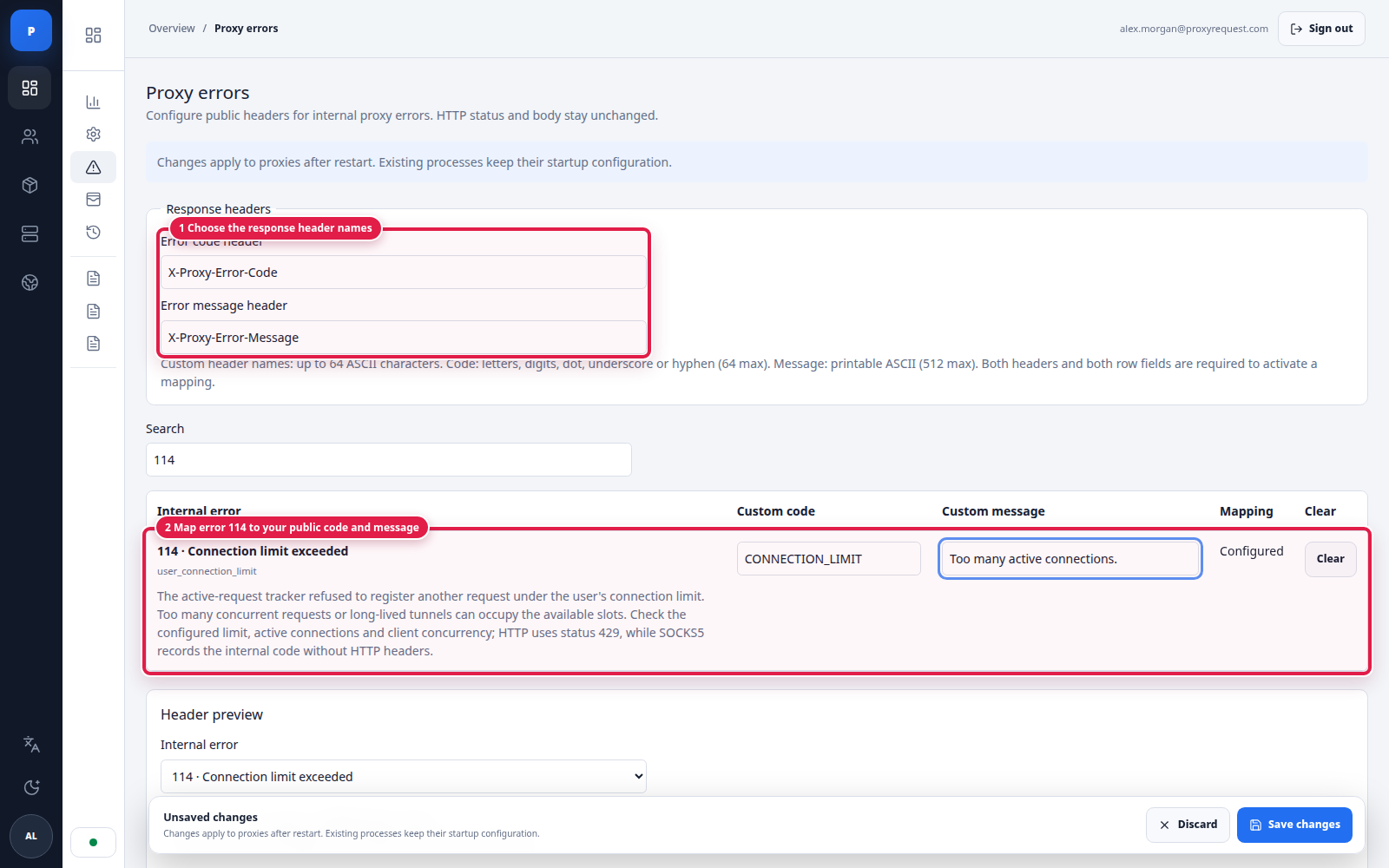
- On the General tab, set Error code header to
X-Proxy-Error-Codeand Error message header toX-Proxy-Error-Message. These are example names, not defaults. - Open User errors and search for
114. The description under Connection limit exceeded explains when this error occurs. - Enter
CONNECTION_LIMITas the custom code andToo many active connections.as the custom message.
 Open full size
Choose both response-header names in General before configuring individual errors.
- These names become HTTP response headers.
- The sidebar groups configurable errors by their source.
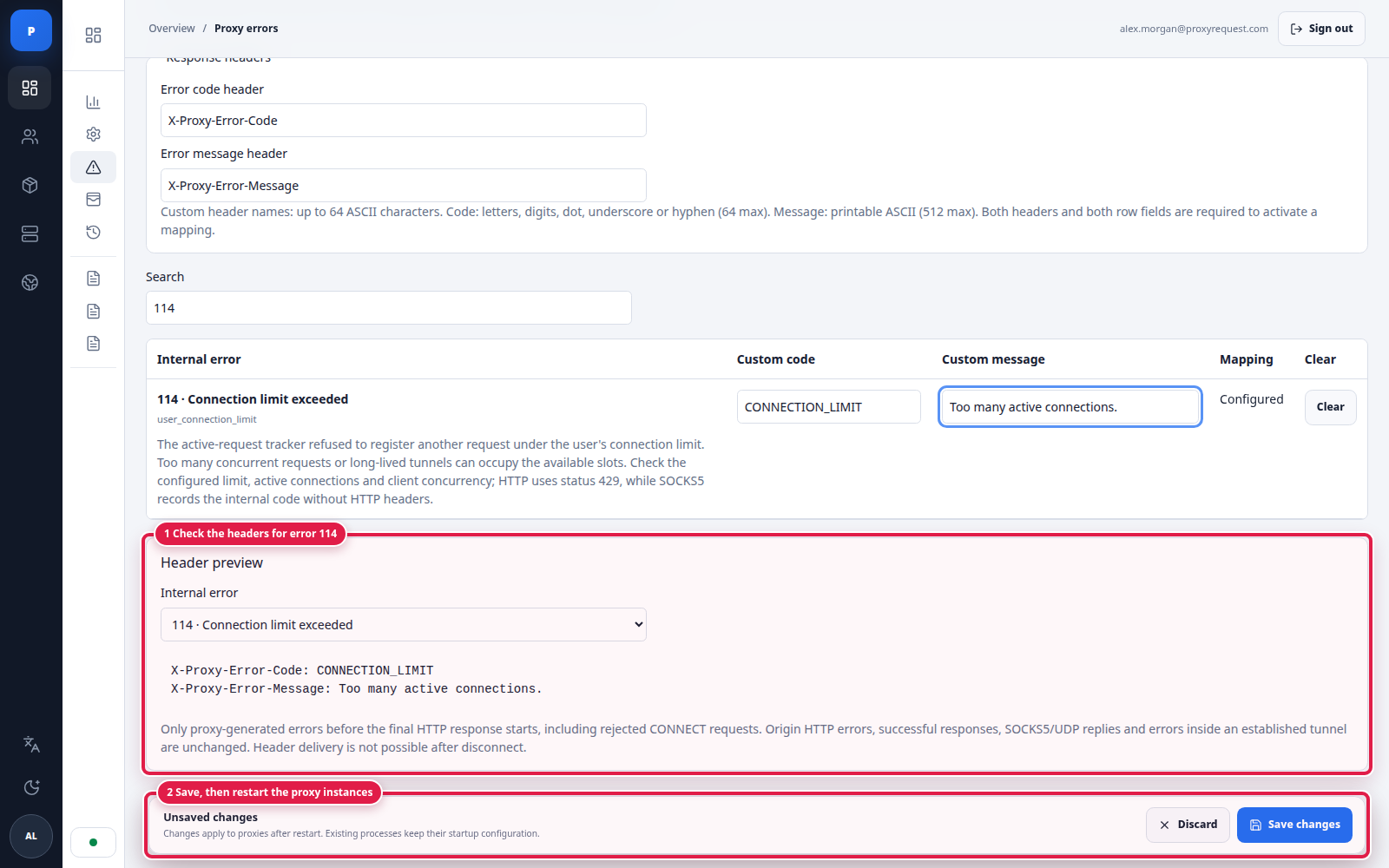
- Check Header preview while editing error
114, then click Save changes. The preview follows the error being edited within the current tab. - Restart the proxy instances to load the saved configuration.
The preview includes unsaved edits. A mapping sends headers only when both header names and its code and message are valid. Neither the preview nor a saved draft confirms that a running proxy has loaded the settings.
 Open full size
Find an HTTP-eligible error, enter its public values, and check the live preview before saving.
- The internal error remains 114; you choose the public code and message.
- Preview shows the two headers this error will send after saving and restarting.
Header names must be different, valid ASCII names of at most 64 characters; protocol headers such as Connection are reserved. Codes accept up to 64 ASCII letters, digits, dots, underscores, or hyphens. Messages accept up to 512 printable ASCII characters, without line breaks. Values are literal text, not templates. Do not include credentials or private backend details.
What the proxy sends
Section titled “What the proxy sends”At startup, the proxy reads the settings from the API. When it encounters a configured error, it looks up the internal code and adds your two headers to the HTTP error response. The HTTP status and response body stay unchanged.
To check this example, use a test account whose concurrent connection slots are already occupied. Keep those connections open, then send another authenticated request:
curl 'http://ip-api.com/json' \ --include \ --proxy 'http://{proxy_host}:{proxy_port}' \ --proxy-user '{proxy_username}:{proxy_password}'HTTP/1.1 429 Too Many RequestsConnection: closeX-Proxy-Error-Code: CONNECTION_LIMITX-Proxy-Error-Message: Too many active connections.Replace placeholders in braces with your values. Responses use synthetic example data.
Replace the gateway and credentials with your test values. This is an illustrative response from the proxy, not from ip-api.com.
Here, 429 is the HTTP status, 114 is the internal error, and CONNECTION_LIMIT is your public code. The body is empty. Without an exceeded connection limit, this request should not produce this error. Release the occupied slots before retrying safe requests.
If headers are missing
Section titled “If headers are missing”Check that both header names and both row values are saved, and that the proxy was restarted. Successful responses and ordinary errors returned by destination sites do not receive these headers. SOCKS5 replies do not carry them either.
HTTP CONNECT refusals can include headers before a tunnel is established. Once a final response has started or a tunnel is open, the proxy cannot add a new HTTP error response. A disconnected client cannot receive one. See proxy troubleshooting for other failure paths.
Turn it off
Section titled “Turn it off”Use Clear on a row to disable that mapping. To disable all custom error headers, empty either header-name field. Save and restart the proxy instances in both cases.