Changelog

What’s new in ProxyRequest.

Versioned routing, accounting, API, dashboard, and infrastructure changes in one release record.

Release record

Filter by change type.

Traffic Analytics in the Control Center
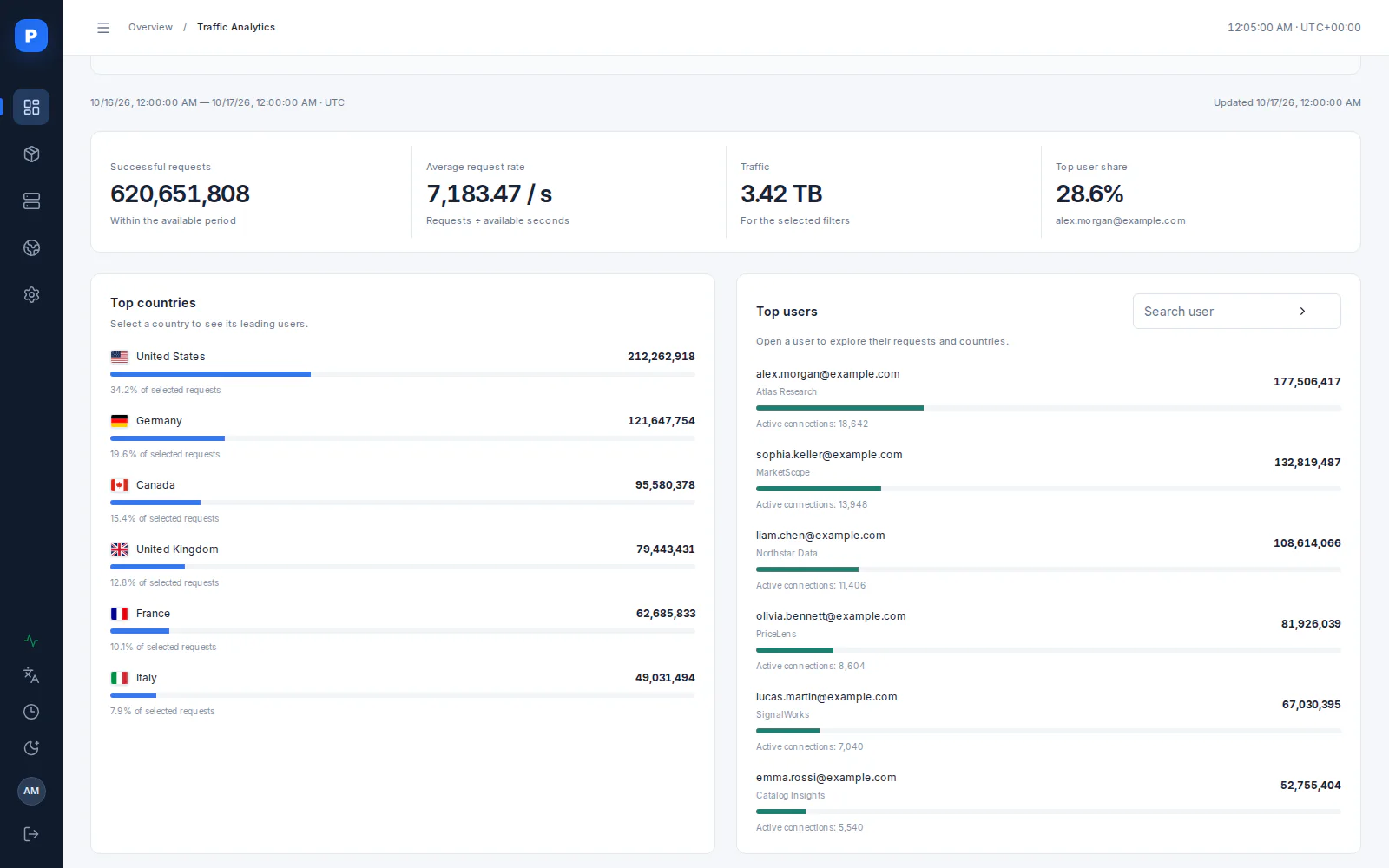
The admin panel’s Control Center workspace now includes a dedicated Traffic Analytics page. Explore the countries your customers use most, identify the users generating the most requests and traffic, and understand where demand is concentrated. Detailed breakdowns and activity widgets help you evaluate provider and pool performance, make informed cost decisions, and fine-tune your routing configuration.
New
Your most popular destinations
See which countries receive the most successful requests and how much each contributes to the selected traffic. Open a country to explore its leading users and understand geographic demand.
Your most active users
Identify customers generating the most requests, sort detailed results by traffic volume, and view each user’s share of the total. Explore individual users or parent accounts to understand usage across your customer base.
Metrics, trends, and detailed activity
Review successful requests, average request rate, total traffic, and the top user’s share together. Follow activity over time, inspect user-level country breakdowns and active connections, and open the request feed for a closer look.
A clearer basis for routing and cost decisions
Filter by country, user or account, package, provider, cluster, and protocol. Use these focused views alongside your provider and pool analytics to evaluate demand, refine pool composition, and choose a more effective balance of provider cost and service quality.
Sub-User Management for Regular Customers
Sub-user management is now available to regular customers as well as resellers. Split your existing traffic balance between sub-users, control how much each can use, and recover unused data when a sub-user is deleted or its data is reset.
New
Sub-users for regular customers
Regular customers can now create and manage sub-users under their own account. When you create a sub-user with an initial data allocation, that traffic is transferred from your main account to the sub-user. The same balance transfer applies when you add more data later.
Allocate only the traffic you have
For packages with a data allowance, allocation uses your available balance. You cannot give a sub-user more traffic than remains in your main account. For example, allocating 20 GB from a 100 GB balance leaves 80 GB available on the parent account and 20 GB on the sub-user.
Recover unused data on deletion or reset
Deleting a sub-user or resetting its data returns the remaining unused traffic to the parent account. Traffic already consumed is not refunded. If that sub-user has used 5 GB of its 20 GB allocation, the remaining 15 GB returns to the parent, bringing its balance back to 95 GB.
How this differs from reseller sub-users
Resellers assign virtual quotas: the total traffic granted to their sub-users can exceed the reseller’s current balance. Assigning a quota does not transfer that amount upfront; actual usage is charged against the parent reseller account’s shared balance. Regular customers instead move existing traffic into each sub-user’s balance, so their allocations cannot exceed what they have available.
Block Destination Ports by Protocol
Administrators can now control which destination ports users cannot access through each cluster. Separate TCP and UDP blocklists let you tailor restrictions to each protocol and reduce opportunities for spam and other malicious activity.
New
Independent TCP and UDP restrictions
Maintain separate lists of blocked destination ports for TCP and UDP. A restriction for one protocol does not automatically block the same port for the other.
Configure access when creating or editing a cluster
In the admin panel, open Access restrictions when creating or editing a cluster. Use Blocked TCP destination ports and Blocked UDP destination ports to define the ports users must not reach. Enter one port per line.
Limit access to services used for abuse
For example, block TCP port 25 to restrict access to SMTP services commonly targeted for spam delivery. Apply the ports relevant to your network policy to help prevent misuse of your proxy infrastructure.
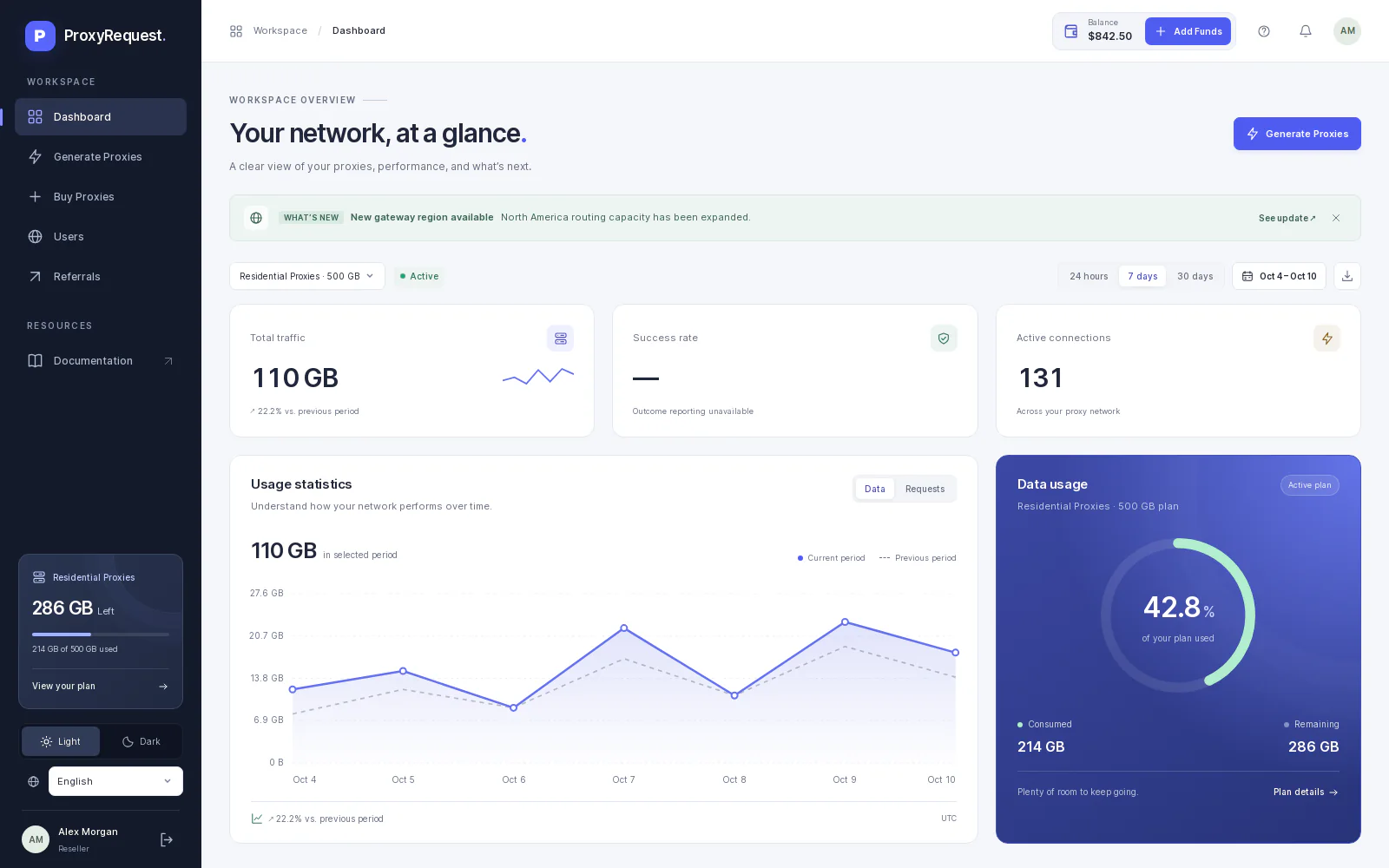
A Completely Redesigned Customer Dashboard
Our completely redesigned customer dashboard is now available at dashboard.proxyrequest.com. We rebuilt the experience to make everyday tasks more practical, intuitive, and easier to understand. We also significantly expanded its functionality, bringing most of the platform’s customer-facing capabilities into one workspace—from usage analytics and proxy management to purchases, invoices, reseller customers, and account integrations. Use this dashboard as a starting template for your own white-label website.
New
More of the platform in one workspace
Review usage and requests, generate proxies, buy packages, follow invoices, manage reseller customers, and configure account integrations from the expanded customer dashboard.
Improvements
Clearer everyday workflows
A completely rebuilt design makes navigation, analytics, purchases, and account management more practical and easier to understand.
New
A foundation for your white-label website
Use the supplied dashboard as a starting template for your own white-label site, with your brand identity and the customer workflows already connected to the platform.
ProxyRequest 3.0 — A Simpler Way to Run Your Proxy Business
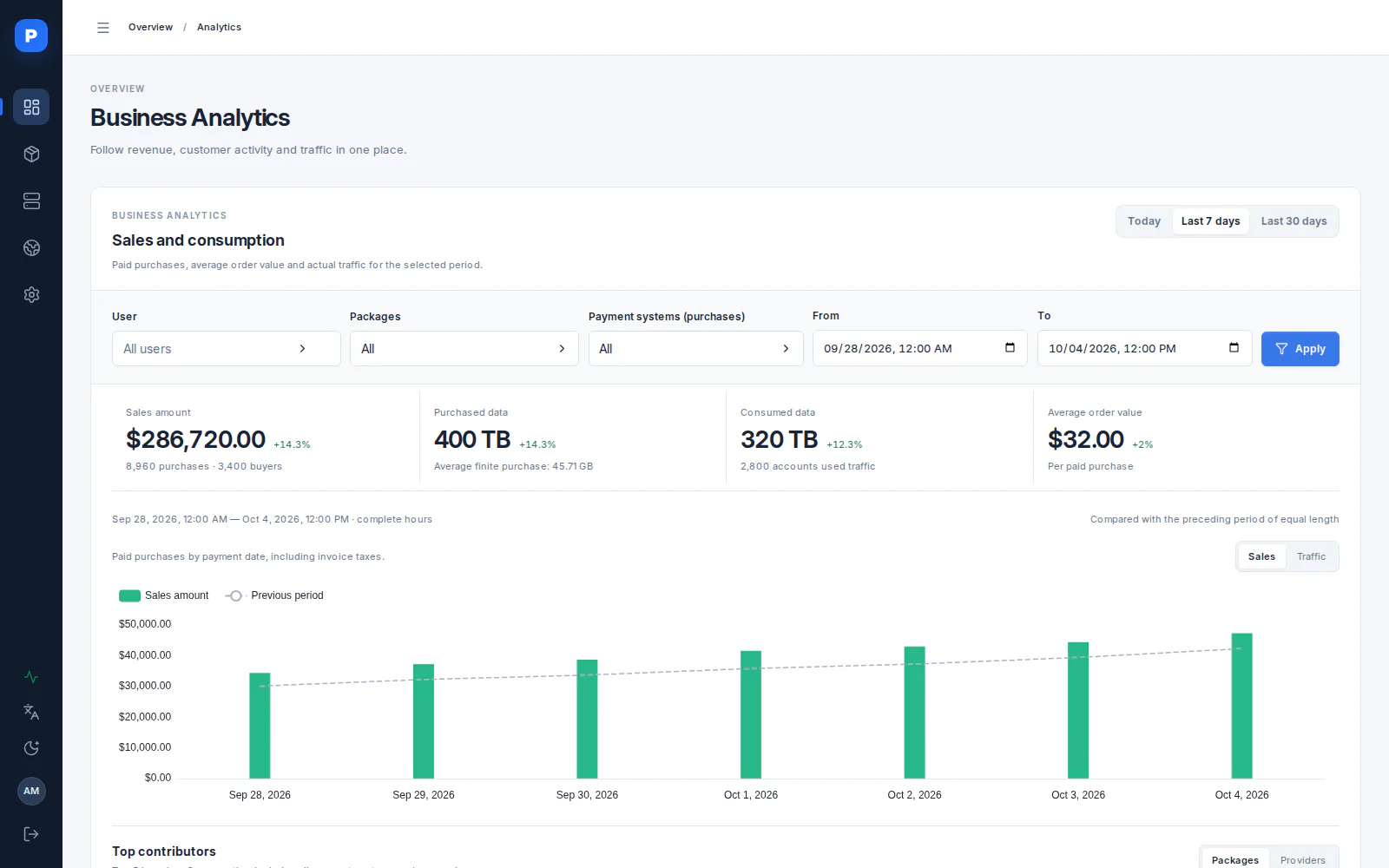
We rebuilt the admin frontend around the work of running a proxy business. Sales and usage are easier to read, provider and pool performance easier to monitor, and common setup tasks easier to finish. The detailed controls you rely on are still there, with less effort needed to find and use them.
New
A clearer picture of your business
Business Analytics brings sales, purchased and consumed data, and average order value into one readable view. Operational screens make it easier to follow provider health, request success rate, and proxy pool performance, so your team can spot changes and decide what needs attention.
Improvements
Set up packages and providers in fewer steps
Guided flows bring package pricing, provider allocation, targeting, and review into a clearer sequence. You can connect new upstream providers in a few clicks and edit existing ones without losing access to the settings you need for more complex setups.
Keep provider-sourced locations current
Set a recurring synchronization schedule for location dictionaries imported from providers. Their available locations can then refresh from upstream data automatically, reducing manual imports as provider coverage changes.
Faster Package Location APIs
Package location APIs now use a Rust location service to return the locations available from providers connected to each package. In installations with many packages and providers, observed response times improved from 5–6 seconds to 30–50 ms, roughly 100× faster.
Observed response time in large installations
5–6 s
Before
30–50 ms
Now
~100×
Faster
Improvement
Provider-aware location results
The location endpoints return available continents, countries, regions, cities, ASNs, and ISPs based on the providers connected to the requested package. These package-specific lookups now run through the Rust location service.
Faster responses with many packages and providers
In large installations, responses that previously took 5–6 seconds now take 30–50 ms in observed cases. This is roughly a 100× improvement for the location API; response times still depend on the deployment and request.
Provider Data Balances & Low-Balance Alerts
Track how much traffic remains with each upstream provider before the balance reaches zero. Record the provider’s current balance once, and ProxyRequest uses existing provider analytics to keep the estimate current and warn your team when it is time to top up or adjust the routing pool.
Operational warning thresholds
<30%
Yellow warning
<20%
Red warning
Manual
Top up or remove
New
Set a balance for each provider
Open the provider’s Data balance section and record the total data still available together with the time of the observation. This establishes a new baseline; it is not treated as an incremental top-up. The panel then shows the recorded amount, usage since the observation, calculated remaining traffic, and balance history.
Estimates backed by provider analytics
ProxyRequest subtracts measured provider traffic from the recorded balance and refreshes the estimate automatically. If analytics are stale or unavailable, the interface shows that state explicitly instead of silently reporting a zero balance.
Improvement
See low balances before requests are interrupted
The admin interface now highlights providers used by active packages when their remaining balance falls below 30%. A yellow warning covers balances from 20% up to 30%; below 20%, the warning turns red. Each alert links directly to the provider’s balance details.
Your team stays in control of the response
Use the warning to replenish the provider balance or remove the provider from the active pool before its data runs out. ProxyRequest does not automatically disable providers, pools, or packages when a threshold is crossed.
Custom Headers for Proxy Errors
Make proxy failures easier to understand and handle. You can now choose your own HTTP response header names and give each supported proxy error a custom public code and message — so your customers and integrations receive an error contract that fits your product.
An error your client can act on

An authenticated request to http://ip-api.com/json exceeds the user's concurrent connection limit. With a custom mapping enabled, the proxy returns:

HTTP/1.1 429 Too Many Requests
Connection: close
X-Proxy-Error-Code: CONNECTION_LIMIT
X-Proxy-Error-Message: Too many active connections.

Here, internal error 114 is mapped to CONNECTION_LIMIT. The client can recognize the cause and reduce concurrency before retrying a safe request. This is an illustrative proxy-generated response, not an error from ip-api.com; the response body remains empty.

New
Your header names, codes, and messages
Open Overview → Proxy errors in the admin panel, set the code and message header names, and customize the public values for each supported error. Detailed cause descriptions help you choose the right mapping. For the example above, use X-Proxy-Error-Code and X-Proxy-Error-Message, then map 114 · Connection limit exceeded to the code and text shown.
Settings are global and optional. Restart the proxy instances after saving to load the new configuration. Both header names and a complete code/message mapping are required for an error to include the custom headers.
Set up proxy error headers →
More context, the same HTTP behavior
Custom codes supplement the HTTP status; they do not replace it or change the response body. Headers are added only for configured proxy errors that can still return an HTTP response. Successful responses, ordinary destination-site errors, and SOCKS5 replies are unchanged.
HTTP ↔ SOCKS5: Use the Protocol Your Tools Need
Your tool and your provider no longer have to use the same proxy protocol. ProxyRequest can send HTTP client traffic through a SOCKS5 provider and SOCKS5 TCP traffic through an HTTP provider. Keep the proxy interface your application already supports; the gateway handles the provider-side connection.
HTTP client → SOCKS5 provider
Your HTTP clientHTTP request or CONNECT
ProxyRequestOpens a SOCKS5 connection
SOCKS5 providerConnects to the destination

An HTTP-only scraper can use a SOCKS5-only provider without a separate converter. Ordinary HTTP requests are forwarded through the SOCKS5 connection; HTTPS uses a tunnel.

SOCKS5 client → HTTP provider
Your SOCKS5 clientTCP connection request
ProxyRequestOpens an HTTP CONNECT tunnel
HTTP providerConnects to the destination

A SOCKS5-configured browser or script can use an HTTP-only provider. The provider must support CONNECT and permit the requested destination port. The client's TCP traffic then passes through that tunnel.

More provider choice, fewer client changes
Operators can connect providers with different protocol support to the same gateway. Customers can keep their existing HTTP or SOCKS5 integration instead of changing libraries or running another adapter. Authentication, targeting, and session rules still apply; conversion does not add features that a provider lacks.
Automatic selection, with an explicit override
For new routes, the gateway prefers the client's protocol. If the selected provider has no endpoint for it, the gateway uses the other protocol. If both are available, it keeps the native path. This happens before connecting — it is not a retry after a timeout or a failed request. Compatible sticky sessions keep their selected endpoint and protocol.
The backend's explicit HTTP → SOCKS5 setting takes priority. When enabled, HTTP traffic must use SOCKS5, even if HTTP endpoints also exist. A SOCKS5 endpoint is required in the active region; the gateway does not silently switch back to HTTP.
Two clients, the same gateway

These commands request the same HTTPS page. Replace the example gateway and credentials with yours, using an account that allows the chosen client protocol.

HTTP client, SOCKS5-only provider:

curl --proxy http://proxy.your-domain.example:8000 \
  --proxy-user 'USERNAME:PASSWORD' \
  https://example.com/

SOCKS5 client, HTTP-only provider:

curl --proxy socks5h://proxy.your-domain.example:8000 \
  --proxy-user 'USERNAME:PASSWORD' \
  https://example.com/

socks5h passes the destination hostname to the proxy instead of resolving it in curl. Provider selection is handled by the gateway, not by these commands. HTTPS remains encrypted between the client and the destination; conversion does not decrypt it.

TCP conversion, not UDP over HTTP
SOCKS5 UDP still requires a native UDP-capable SOCKS5 route. It is not converted to HTTP. Provider restrictions, account limits, and destination access rules remain in effect.
Forwarded HTTP requests also remove the client's Proxy-Authorization and hop-by-hop headers. Proxy credentials are not sent to the destination; site-level Authorization is preserved.
HTTP, CONNECT, and SOCKS5 usage →
More Payment Systems, by Popular Request
You asked for more ways to accept payments, and we have expanded the payment systems supported by ProxyRequest. The lineup now includes 33 integrations, giving you more choice when setting up payments for the countries and customers you serve.
More ways to accept payments
33
Supported integrations
23
Fiat payment systems
10
Cryptocurrency gateways
New
Payment systems by country
Ukraine
WayForPay, monobank, LiqPay
Turkey
iyzico, PayTR
Poland
PayU, Tpay, Przelewy24
Czechia
GoPay, Comgate
Spain
MONEI, Redsys
France
PayPlug
Germany
Unzer, PAYONE
Italy
Nexi XPay
Kazakhstan
Halyk ePay
Finland
Paytrail
International and regional payment systems
International
Stripe, Checkout.com, Braintree
European Economic Area
Mollie
Northern Europe
Vipps MobilePay
Cryptocurrency payments
Coinbase Commerce, Cryptomus, CoinGate, Whitepay, UseGateway, Binance Pay, Any.Money, CoinPayments, NOWPayments, and BTCPay Server.
Choose the integrations that fit your business and configure them with your own merchant accounts. Our payment gateway guide lists the supported providers, currencies, and setup details.
Explore supported payment gateways →
Rust Proxy Runtime in Production
ProxyRequest production traffic is now served by our Rust proxy runtime. The new data plane lowers infrastructure overhead and keeps response times more consistent when traffic, provider selection, and plan rules put the system under pressure.
A more efficient production data plane
3–5×
Lower CPU usage
5–8×
Lower RAM usage
Lower
Tail latency
New
Rust proxy runtime now serves production traffic
The ProxyRequest data plane has moved to a purpose-built Rust runtime for HTTP, CONNECT, and SOCKS5 traffic. Bounded connection handling, provider work, queues, and buffers keep resource use predictable as traffic grows, while the existing control plane continues to manage routing, sessions, accounting, and provider configuration.
RustProductionHTTP & SOCKS5
Improvements
A smaller infrastructure footprint
In matched internal measurements against the previous production proxy written in Go, the Rust runtime used about one-third to one-fifth as much CPU and one-fifth to one-eighth as much RAM. That corresponds to 3–5× lower CPU usage and 5–8× lower memory usage across the measured profiles.
These are observed ranges, not fixed guarantees. The result varies with traffic type and concurrency, the number and configuration of connected upstream providers, and the number and complexity of active tariff plans and their routing or targeting rules.
3–5× CPU5–8× RAMMeasured ranges
Fewer unusually slow requests
p95 is the time within which 95 out of every 100 requests finish, and p99 covers 99 out of every 100. Lower tail latency means the handful of requests at the slow end now spend less time inside the proxy, instead of being hidden by a fast average.
Reducing those slow outliers limits stalls during traffic bursts, makes request behavior more stable, and helps each proxy instance sustain more useful throughput at both the 95th- and 99th-percentile boundaries.
Lower p95Lower p99Stable throughput
Idempotent API Mutations and SDK Support
Retry critical creates, deletes, and data allocations without duplicating a completed operation. The public contract now documents replay-safe mutation keys, optimistic concurrency, and matching behavior across every official SDK.
Safer state changes
12
Protected mutations
24h
Successful replay window
3
Official SDKs
New
Replay-safe critical mutations
Twelve operations declared by the public contract now accept an optional Idempotency-Key. Repeating the same request with the same key replays its successful response for 24 hours and sets Idempotency-Replayed. Reusing a key for a different request, or while the first request is still running, returns 409 Conflict; in-progress responses include retry guidance.
Inspect supported operations → Download the OpenAPI specification →
Idempotency-Key409 ConflictReplay metadata
Optimistic concurrency with ETags
Documented resource responses expose a strong ETag. Supported updates and deletes accept that value through If-Match, preventing a stale client from overwriting a newer representation. A mismatch returns 412 Precondition Failed together with the current ETag.
ETagIf-Match412 Precondition Failed
Improvements
Official SDK support for safe retries
The JavaScript, Python, and PHP SDKs generate keys automatically for supported mutations, accept stable application-provided keys, and reuse one key across bounded retries after ambiguous network outcomes. Response metadata exposes replay and ETag values, while automatic key generation remains configurable.
JavaScriptPythonPHP
Generated reference aligned with the public contract
The API Reference and downloadable OpenAPI document now include every supported idempotency header, replay response, conditional request header, and concurrency error alongside the existing 82-operation surface.
Browse the API Reference → Download OpenAPI YAML →
OpenAPIAPI ReferenceContract parity
Official SDKs for JavaScript, PHP, and Python
Integrate the ProxyRequest management API without maintaining request wrappers by hand. All three official SDKs cover the complete public API and share the same authentication, resource, error, pagination, file-download, and webhook-verification behavior.
One API, native developer experience
3
Official SDKs
82
API operations
1
Shared OpenAPI contract
New
JavaScript and TypeScript SDK on npm
The universal @proxyrequest/sdk package supports modern browsers and Node.js 22+, ships ESM and CommonJS entry points, and includes complete TypeScript declarations.
npm install @proxyrequest/sdk pnpm add @proxyrequest/sdk yarn add @proxyrequest/sdk
Open the npm package → View the JavaScript SDK on GitHub →
TypeScriptESMCommonJS
PHP 8.5 SDK on Packagist
The typed PHP client integrates through Composer and provides resource-oriented services, PSR-compatible HTTP behavior, normalized API exceptions, pagination, downloads, and webhook verification.
composer require proxyrequest/php-sdk
Open the Packagist package → View the PHP SDK on GitHub →
PHP 8.5ComposerPSR
Sync and async Python SDK
The Python 3.11+ SDK is published on PyPI with typed synchronous and asynchronous clients. Install the verified wheel or source distribution directly from the public index with the package manager used by your project.
python -m pip install proxyrequest-sdk uv add proxyrequest-sdk poetry add proxyrequest-sdk pdm add proxyrequest-sdk
Open the PyPI package → View the Python SDK on GitHub →
Python 3.11+SyncAsync
Improvements
The latest public API contract is now available on the documentation site
The downloadable OpenAPI document now matches the contract used to generate every official SDK. Teams can inspect the same schemas, paths, authentication rules, and response models whether they use generated clients or build an integration directly.
Download the OpenAPI specification → Explore the API resource map →
OpenAPIContract parityDocumentation
Traffic Balance Visibility in Webhooks
Usage webhooks now carry a durable balance snapshot for both direct customers and sub-users. Integrations can react to a normalized remaining percentage, distinguish unlimited packages, and show when and how much traffic was last added.
Balance automation
0–100%
Normalized balance
2
Customer ownership modes
Exact
Latest top-up metadata
New
Low-balance automation from every usage webhook
The nested order object now includes data_allocated, data_available, and data_available_percentage. Clients can apply their own thresholds and notify customers before their traffic allowance is exhausted.
Review the webhook event fields →
webhookstraffic balance
Latest top-up amount and timestamp
latest_data_top_up and latest_data_top_up_date identify the exact most recent allocation. Legacy orders without reliable history return null instead of an estimate.
top-upsdata lifecycle
Improvements
Consistent parent and sub-user balances
Direct users, sub-users with purchased orders, and virtual sub-users now receive balances with ownership-aware semantics. Unlimited packages are explicit and always report a normalized percentage of 100.
Read the webhook integration guide →
sub-usersdurable accounting
Proxy Metrics — Deeper Operational Analytics
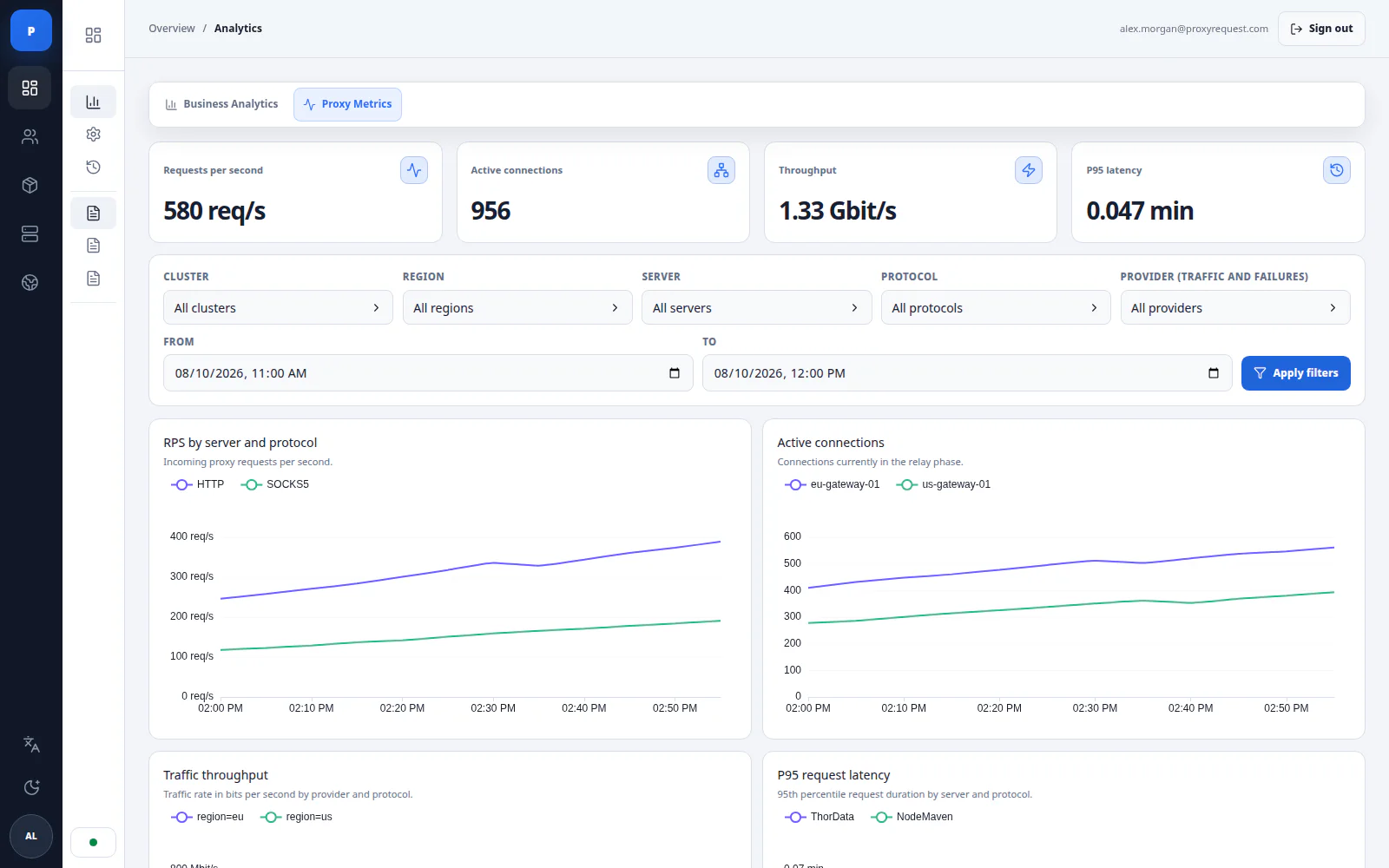
A new Proxy Metrics workspace gives operators a deeper view of proxy traffic, gateway behavior, and upstream provider reliability. Use the same filters and time window across every panel to compare providers, investigate degradation, and decide when routing or supplier action is required.
Operational visibility
4
Live KPI summaries
6
Diagnostic panels
31d
Maximum analysis window
New
One workspace for live proxy behavior
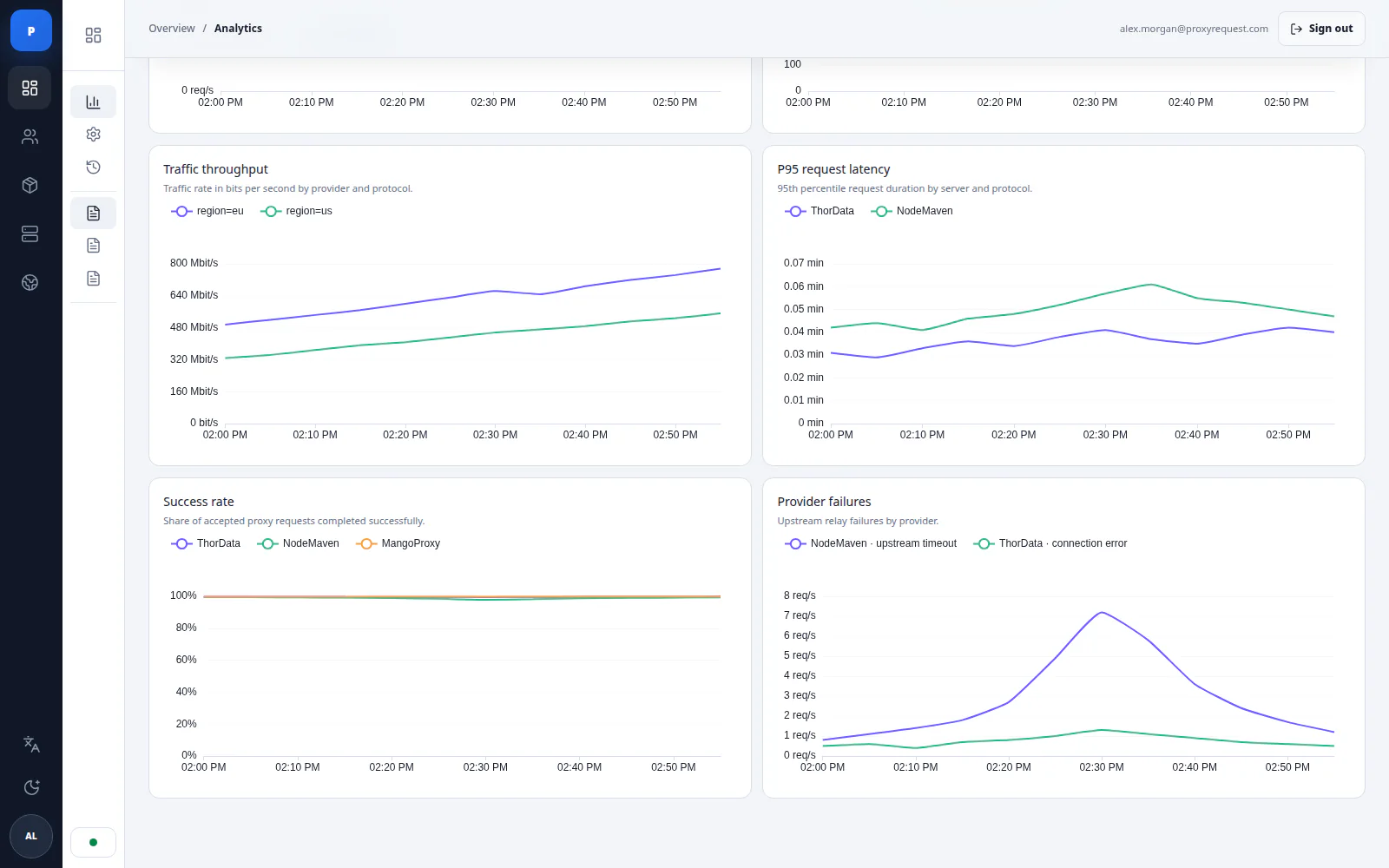
The Analytics area now includes a dedicated Proxy Metrics tab. Four KPI cards summarize requests per second, active connections, traffic throughput, and P95 request latency, while six synchronized charts expose those signals alongside success rate and provider failures.
proxy metricsoperational analytics
Shared infrastructure and provider filters
Narrow an analysis by cluster, region, server, protocol, upstream provider, and an exact date-time range of up to 31 days. Applying one scope to every panel makes it easier to compare the same incident window without assembling separate reports.
filtersincident window
Improvements
Faster provider and incident diagnosis
Success-rate and failure panels make upstream degradation visible next to traffic and latency. Operators can identify anomalies, compare supplier behavior, gather evidence for an incident, and make informed routing or provider decisions without treating a single aggregate metric as the whole picture.
Read the analytics and operations guide →
providersincident response
Explicit partial and unavailable states
When the metrics datasource cannot return every series, the workspace marks partial or unavailable data instead of presenting an incomplete view as healthy. Existing results remain visible where possible so the operator retains context during investigation.
data qualityfailure states
Localized Public API Error Responses
Human-readable errors from the public API now follow the caller's requested language. The API supports nine locales, negotiates them through Accept-Language, and returns the effective locale in Content-Language.
API localization by the numbers
9
Supported languages
75
Documented operations
en
Default fallback
New
Public API errors in nine languages
Human-readable validation, authentication, permission, and server error messages are available in English (en), Russian (ru), Ukrainian (uk), German (de), Italian (it), French (fr), Spanish (es), Simplified Chinese (zh-hans), and Japanese (ja). Field names and machine-readable values keep their existing shape.
public api9 languages
Standard HTTP language negotiation
Send the optional Accept-Language request header, for example Accept-Language: uk, en;q=0.8. Regional language tags and quality weights are supported. The API chooses the first supported locale with a positive quality value; when the header is omitted or no requested locale is supported, it uses English. Public API language cookies are ignored.
Accept-Languageq-values
Selected locale is explicit in every response
Public API responses return the effective locale in Content-Language and include Vary: Accept-Language so shared caches keep language variants separate. The OpenAPI reference now documents Accept-Language on every operation and Content-Language on error responses.
Open the public API reference →
Content-LanguageVary
Breaking Changes
The translation key was removed from public error payloads
Integrations must no longer read translation or use it as a client-side localization key. Read the existing human-readable error fields, such as detail, non_field_errors, and field-specific message arrays, and select their language with Accept-Language. The server now owns error-message localization and removes legacy translation metadata at every nesting level.
breakingerror contractmigration required
User + Sub-user Analytics Aggregation
The analytics API now supports an optional include_sub_users query parameter. Set it to true to combine the selected user's own activity with all of their sub-users in traffic totals and top-domain reporting.
API release by the numbers
2
Analytics endpoints
1
Optional query flag
false
Backward-compatible default
New
Combined traffic totals and request history
GET /analytics/overall?user_id=…&include_sub_users=true returns transferred bytes and request counts for the selected user and their complete sub-user scope, while preserving the existing date, timezone, and package filters.
Open traffic totals API reference →
analytics/overallaggregation
Combined top-domain reporting
GET /analytics/domains?user_id=…&include_sub_users=true aggregates request count and transferred bytes by destination hostname across the same user hierarchy. Hostname, ledger, package, ordering, and reporting-window filters remain available.
Open top domains API reference →
analytics/domainsreporting
Permission-aware account expansion
Superusers can aggregate any selected user's scope. Resellers can aggregate their own account with all of its sub-users, but cannot expand a separately selected sub-user. The flag is ignored for regular users.
permissionsresellers
Optional by default, validated when supplied
include_sub_users is a boolean and defaults to false, so existing integrations keep their current account scope. Unsupported boolean values are rejected with a validation error instead of being interpreted implicitly.
backward compatiblevalidation
A Completely New Vue 3 Admin Panel
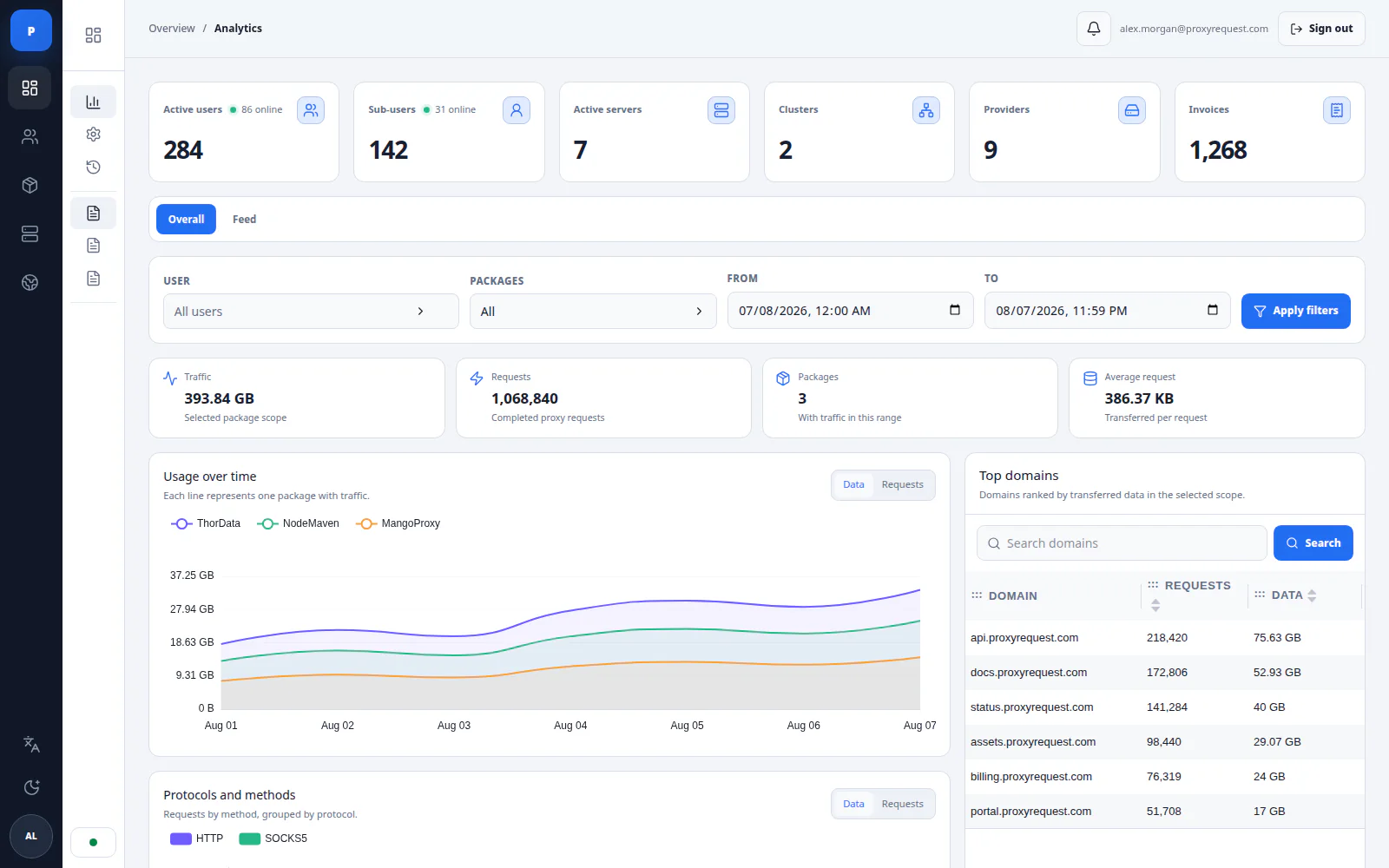
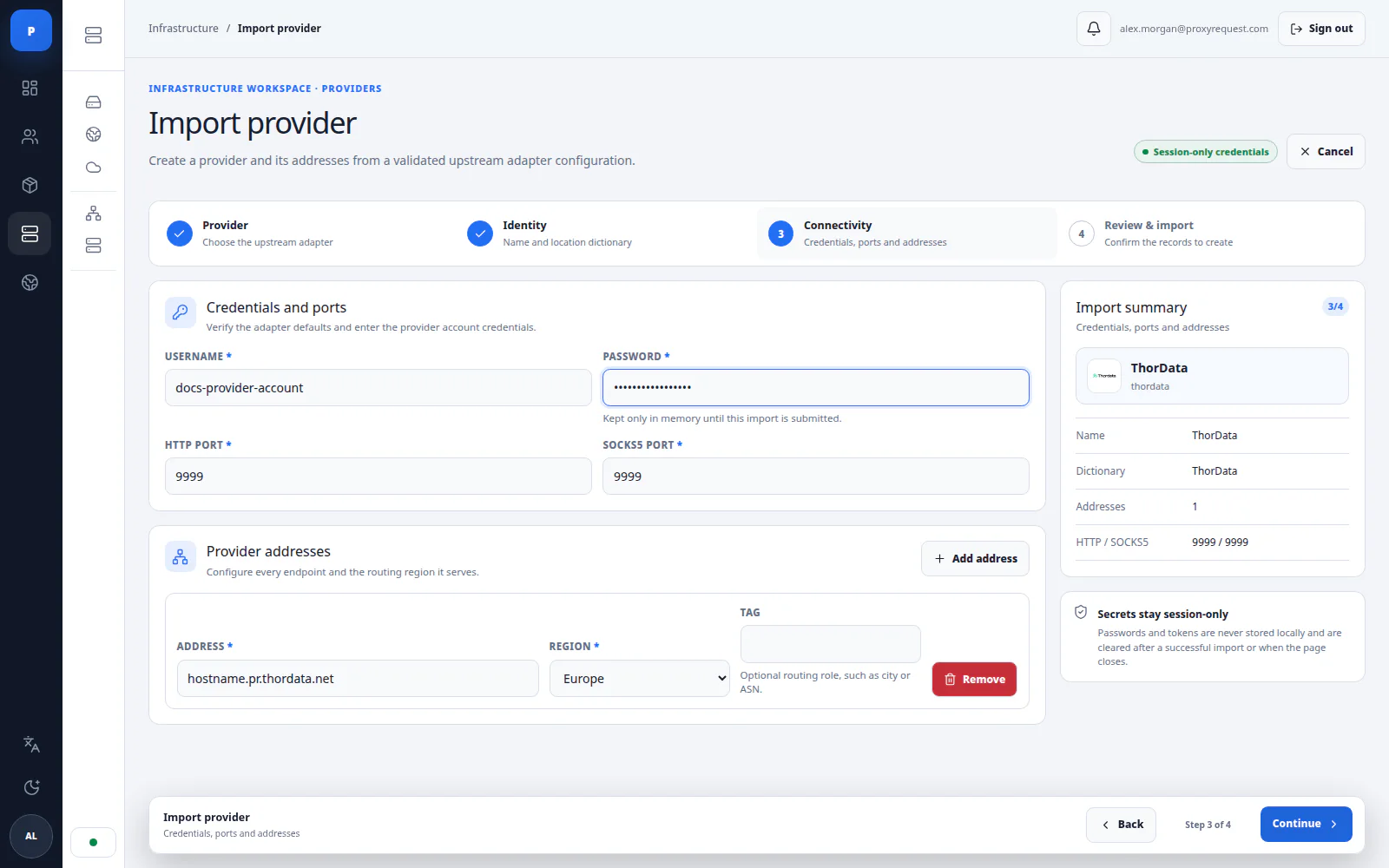
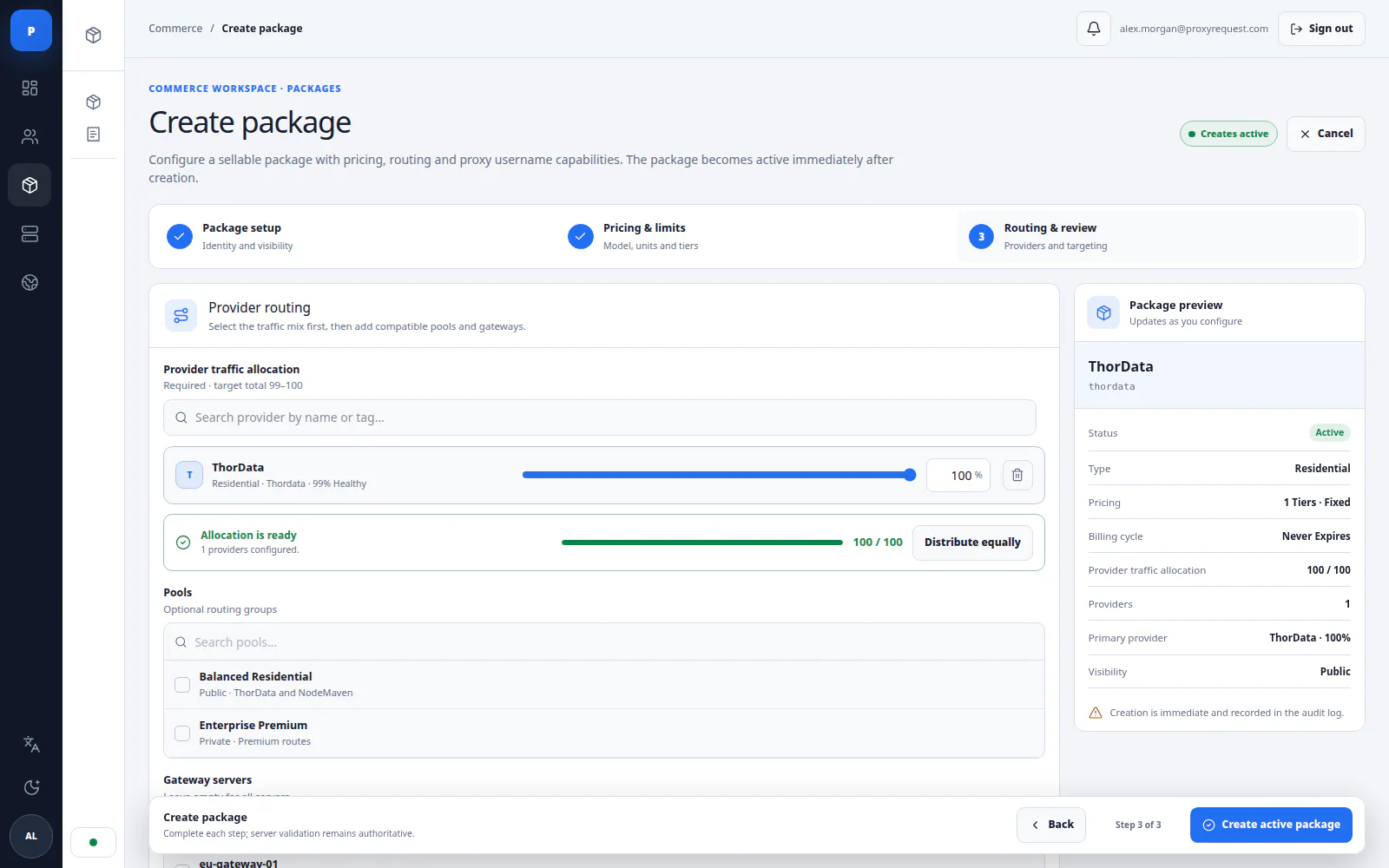
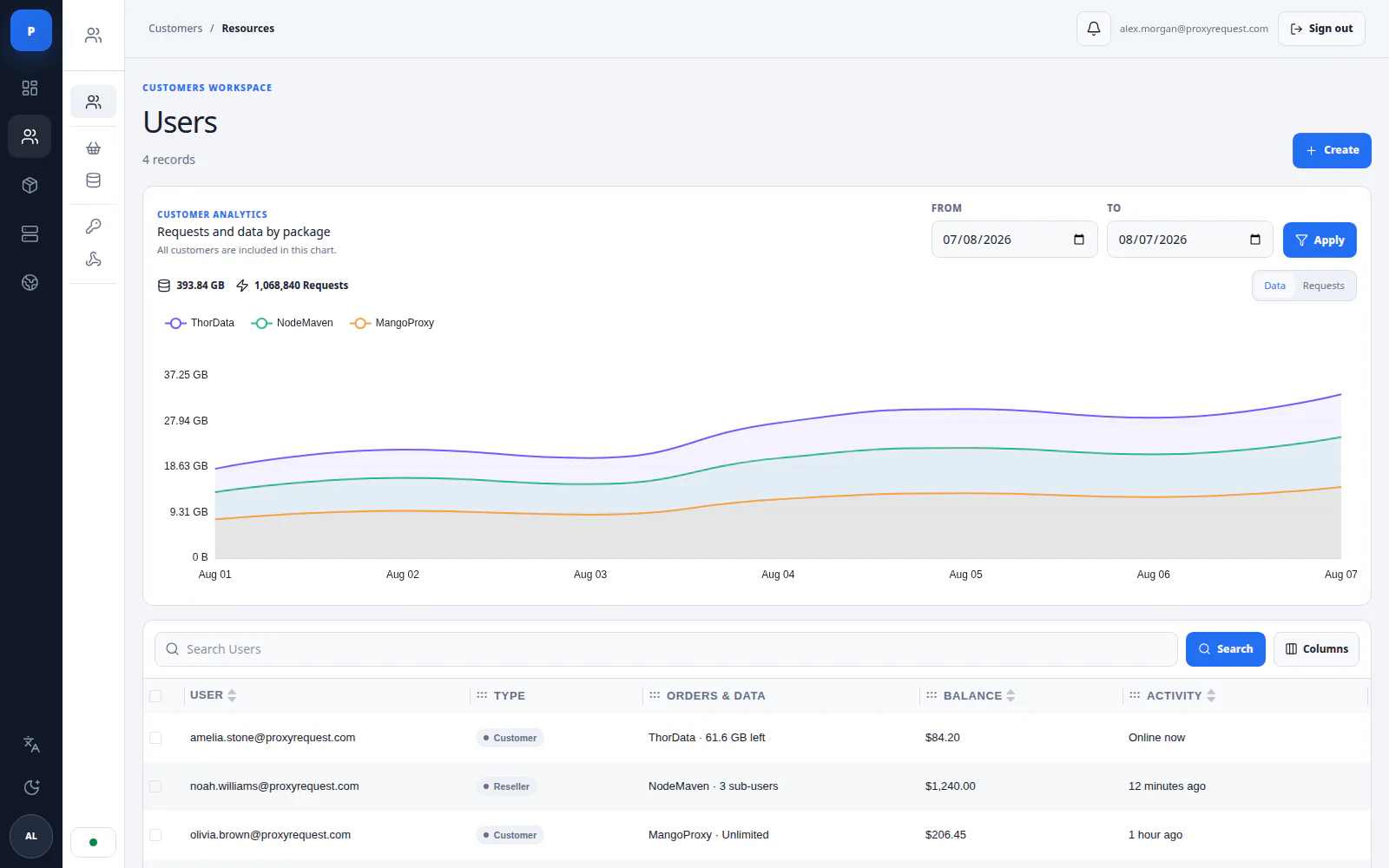
We have released a completely new operator admin panel, rebuilt with Vue 3 around the way proxy businesses actually work. It is significantly easier to navigate, faster to operate, and clearer when managing customers, products, upstream providers, routing, billing, analytics, and infrastructure.
Release by the numbers
Vue 3
New control panel
9
Interface languages
5
Operator workspaces
New
A complete Vue 3 operator experience
The previous administration experience has been replaced with a purpose-built control panel organized into Overview, Customers, Commerce, Infrastructure, and Locations workspaces. Navigation, page structure, and actions now follow the operator workflow instead of the underlying data model.
vue 3admin
Guided creation and import workflows
Step-by-step workflows now cover customers and sub-users, packages, invoices, coupons, upstream providers, provider addresses, and location dictionaries. Each flow validates its inputs, keeps a live summary visible, and protects unfinished work from accidental navigation.
workflowsvalidation
Operations-focused analytics and infrastructure controls
The new analytics workspace combines traffic, requests, packages, domains, users, sub-users, providers, servers, and clusters. Infrastructure operators can also manage proxy lifecycle actions, restart online servers and clusters, and follow long-running operation status from the same interface.
analyticsinfrastructure
Nine interface languages
The complete control panel is available in English, German, Spanish, French, Italian, Japanese, Russian, Ukrainian, and Simplified Chinese. Language selection is stored with the staff account and follows the operator across sessions.
i18n9 languages
Improvements
Tables that adapt to each operator
Search, filters, ordering, pagination, page size, visible columns, and comfortable, compact, or dense row layouts are now consistent across resources. Table state stays in the URL while personal display preferences are saved for the staff account.
tablespreferences
Safer administrative actions
Granular staff permissions, sensitive-action confirmations, unsaved-change guards, safer cascade deletion flows, and an immutable audit log make everyday management more predictable. Notifications and operation feedback keep background work visible without leaving the current workspace.
access controlaudit
Responsive, brand-aware interface
The panel now works cleanly across desktop and responsive layouts, supports light and dark themes, and applies the deployment brand color throughout the navigation, controls, charts, and status surfaces.
responsivewhite-label
IPv6 Full Coverage & Sub-user API Overhaul
This is the largest infrastructure update since Platform 2.0. Every product tier now supports IPv6 endpoints natively, with full parity to IPv4 — including sticky sessions, geo-targeting, and per-user accounting. Alongside this, the sub-user API has been versioned to v2 with cleaner resource modeling and batch operation support.
Release by the numbers
2.4M+
IPv6 IPs Added
18
New API Endpoints
<0.4ms
Routing Overhead
New
Native IPv6 endpoints on all product tiers
All products now expose a dual-stack endpoint. Clients can force IPv6 by appending @ipv6 to the product string, or leave it unset for automatic selection.
#1204infra
Sub-user API v2 — batch operations & cleaner resource model
Create, update, or suspend up to 500 sub-users in a single request. The new POST /v2/sub-users/batch endpoint is idempotent and returns partial success payloads.
Migration guide from v1 available on request
#1198api
IPv6 geo-targeting with country + ASN filters
IPv6 pool now supports the same geo and ASN parameters as residential IPv4. Specify country=US&asn=AS15169 in the proxy auth string.
#1212routing
Improvements
Dashboard sub-user table now loads 3× faster
Switched to cursor-based pagination and server-side filtering. Tables with 100K+ sub-users now load in under 200ms on the first paint.
#1201ui
Reduced accounting microservice memory usage by ~40%
Rewrote the hot path in the accountant to use pooled byte buffers. Peak RSS under 500M req/day dropped from 1.8GB to 1.1GB per instance.
#1195performance
Webhook Reliability Fixes & Upstream Mixer Weights
Patch release addressing webhook delivery edge cases and adding fine-grained weight configuration to the upstream mixer. Also includes two small API improvements from beta customer feedback.
Fixes
Webhook delivery retry storm under high concurrency
Fixed an issue where failed webhook deliveries could trigger exponential retries simultaneously when a downstream target recovered from a brief outage. Now uses jittered backoff with a per-target concurrency cap of 4.
#1181webhooks
Sticky session IDs not persisting across SOCKS5 reconnects
Session tokens were being re-generated on TCP reconnect due to a missing read from the Redis session store. Sessions now correctly resume the same upstream IP for up to 10 minutes of inactivity.
#1178sessions
Bandwidth counter drift on sub-user rotation
Under certain race conditions when credentials were rotated mid-session, the accountant would double-count the final segment. Counters are now flushed atomically on rotation events.
#1172billing
Improvements
Upstream mixer now supports 0.1% weight granularity
Previously weights were integers (whole percent). You can now allocate as precisely as 0.1% per upstream, useful for gradually shifting traffic during provider migrations.
#1185routing
Upstream Mixer — Visual Config & Live Weight Switching
The upstream mixer is now fully configurable from the dashboard with live weight adjustments that take effect without disconnecting active sessions. Includes a new provider health scoring system that automatically deprioritizes degraded upstreams before they impact your customers.
New
Visual upstream mixer with drag-to-adjust weights
Redesigned the mixer UI to support slider-based weight allocation. Changes are previewed before saving and applied to the live routing table without session disruption.
#1148uirouting
Automatic health-based traffic shifting
New provider scoring engine monitors success rate, latency p95, and error patterns. When a provider drops below threshold, traffic is redistributed proportionally across healthy upstreams — no manual intervention needed.
#1155healthcheck
Breaking Changes
Mixer config API endpoint moved from /api/mix to /api/v1/products/:id/mix
The old endpoint is deprecated and will be removed in v3.0. All automated tooling should update to the new resource-scoped path. The old path returns HTTP 301 through v2.9.
Migration notes available on request
#1151api
Webhook Engine — Event Subscriptions & Delivery Logs
Full webhook system is now generally available. Subscribe to any platform event — sub-user created, bandwidth capped, upstream degraded — and get signed HTTP payloads delivered to your endpoint. Includes a delivery log with replay.
New
22 webhook event types across all platform resources
Events cover sub-user lifecycle, billing, upstream health, and system alerts. All payloads are signed with HMAC-SHA256 using your webhook secret. Full event catalog in the docs.
Webhook event reference available on request
#1109webhooks
Delivery log with one-click replay
Every delivery attempt is logged with request/response headers and body. Failed deliveries can be replayed individually or in bulk from the dashboard or API.
#1115webhooksui
Analytics Overhaul — ClickHouse Backend & Retention Controls
Rewrote the analytics pipeline on ClickHouse. Queries that used to take 8–12 seconds on large accounts now return in under 400ms. Added configurable data retention policies and a new CSV export endpoint.
Improvements
Analytics queries 20–40× faster on accounts with 1TB+ monthly traffic
ClickHouse columnar storage with MergeTree partitioning by day replaces the previous Postgres-based analytics. Aggregation queries across 30-day windows complete in under 500ms regardless of data volume.
#1080analyticsperformance
Configurable data retention — 7 days to 24 months
Set per-account retention policies from the dashboard or API. Raw request logs can be retained shorter than aggregated stats to reduce storage costs.
#1088analytics
SOCKS5 Framing Fixes & QUIC Proxy Support
Several framing-level bugs in the SOCKS5 implementation were resolved — particularly around UDP associate and domain name handling. QUIC proxy support ships as beta, available on the Pro tier.
Fixes
SOCKS5 UDP associate missing BND.ADDR for domain-type requests
Clients sending ATYP=0x03 (domain name) in UDP associate requests received a malformed BND response. Fixed response framing to correctly echo the request address type.
#1041socks5
QUIC proxy support (beta) — HTTP/3 tunneling over QUIC
Pro accounts can now use the QUIC endpoint for HTTP/3-capable targets. Reduces connection overhead by 60% on connection-heavy traffic patterns. Opt in by pointing clients to quic.proxyrequest.com:443.
#1055quicbeta
Platform 2.0 — Complete Infrastructure Rewrite
Platform 2.0 is a ground-up rewrite of the proxy routing core, accounting pipeline, and admin UI. The v1 compatibility layer remains active through December 2025. Every component has been rebuilt for scale: the routing layer now runs in Go with zero-allocation hot paths, accounting uses NATS for sub-millisecond event delivery, and the dashboard is a rebuilt Vue.js SPA.
New
Go-based routing core with zero-allocation hot paths
The proxy routing layer was rewritten in Go. Internal routing overhead dropped from ~12ms to under 2ms p99. Buffer pools and pre-allocated structs eliminate GC pressure on the critical path.
#900core
NATS-based accounting with per-user real-time counters
Every byte transferred publishes a NATS message. The accountant aggregates usage in Redis with 1-second granularity. Sub-user bandwidth caps are enforced within milliseconds of the limit being hit.
#912accounting
Rebuilt admin dashboard — Vue.js SPA with real-time push
New dashboard uses WebSocket subscriptions to push live traffic data. No more page refreshes to see current state. Sub-user table handles 200K+ rows with virtualized rendering.
#955ui
Deprecated
Legacy v1 API — sunset December 31, 2025
All /api/v1/* endpoints remain active through end of 2025. The v2 API is a superset — migration is straightforward for most integrations. Sunset emails went out in July.
v1→v2 migration guide available on request
#901api